

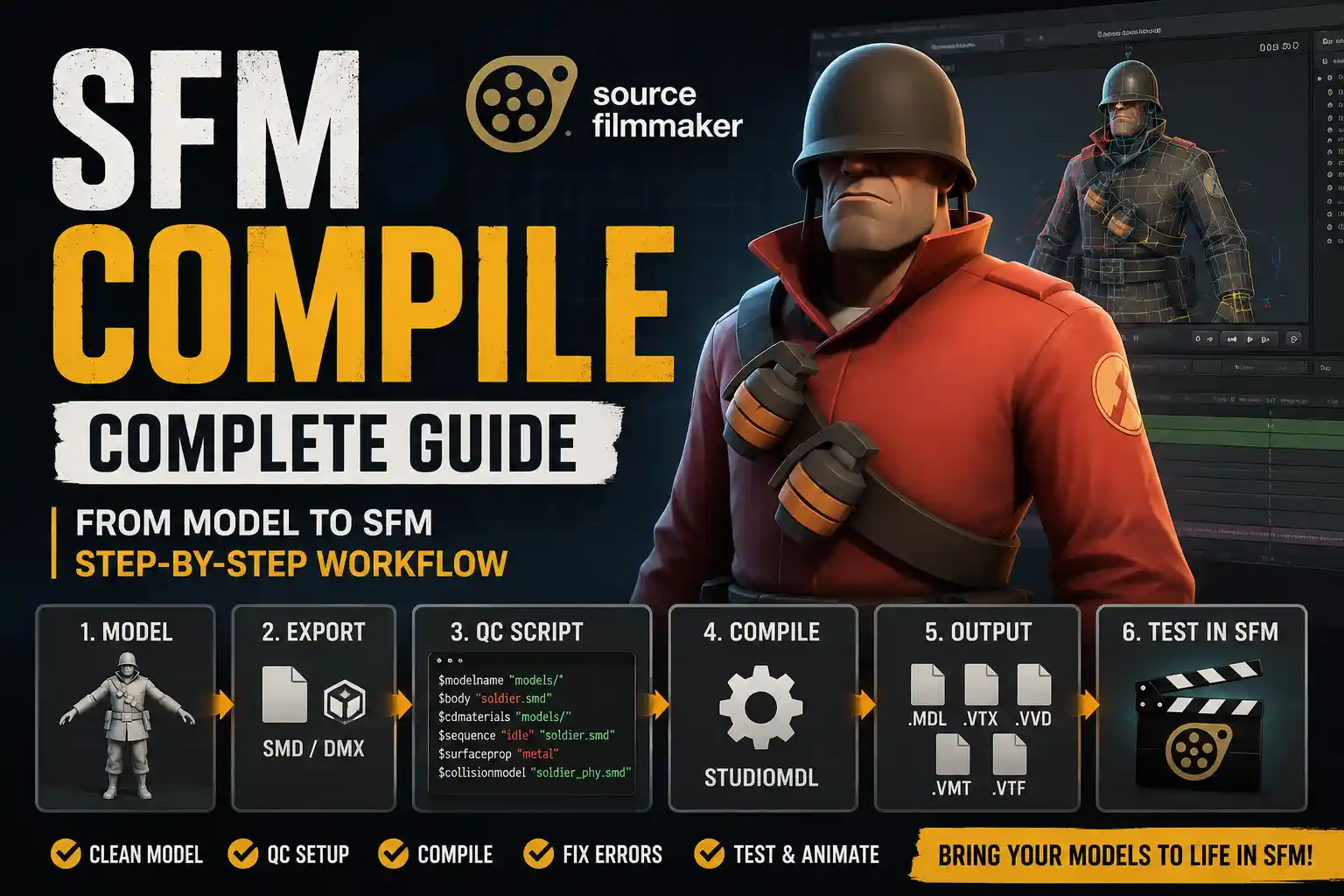
If you create posters, animations, cinematic scenes, or character renders in Source Filmmaker, one technical step often decides whether your custom asset works or breaks: sfm compile. In plain English, it is the process of turning model source files, texture references, skeleton data, animation information, and compile instructions into files that Source Filmmaker can load.
Many beginners treat it like a final “convert” button. A better way to understand it is as an asset packaging and validation process. The compile step checks whether the mesh is exported properly, whether the QC file points to the right folders, whether materials use the right names, and whether the finished model appears in SFM without invisible parts, missing textures, broken bones, or scale problems.
This guide explains what the process means, how it works, which files matter, what errors to avoid, and how to test a finished asset before using it in a serious SFM project.
What Does SFM Compile Mean?
SFM Compile usually refers to compiling a custom model for Source Filmmaker through the Source Engine model pipeline. Source Filmmaker does not use common working files such as .blend, .fbx, or .obj as final production models. Instead, creators export model data into Source-friendly formats, describe the asset through a QC script, and use a compiler such as StudioMDL to generate Source-readable model files.
A compiled model is usually not one file. The main file is commonly .mdl, but supporting files such as .vtx, .vvd, and sometimes .phy are also part of the final asset. Materials and textures are handled separately through .vmt and .vtf files.
There is also a second search intent worth clarifying. Some creators say “compile” when they mean exporting a finished SFM movie. That is a different step. Model compiling prepares a custom asset before animation. Rendering or exporting turns a finished SFM scene into a movie, image sequence, or still image.
Read More: Sruffer DB
Why Model Compilation Matters
Source Filmmaker is built around the Source game engine. Valve describes SFM as the movie-making tool it built and used to make movies inside Source, and the Steam page explains that SFM uses the same assets as the game. That is why game-style asset structure matters.
If a model is not compiled correctly, the final creative work suffers. A wrong material path can create pink-and-black missing textures. A bad skeleton export can break posing. A missing model path can place files in the wrong directory. A scale mismatch can make a prop appear tiny or enormous. A weak collision setup can affect ragdolls or scene interaction.
For creators who port models from Blender, Maya, MMD, Garry’s Mod, Team Fortress 2 mods, or other Source projects, compilation is the bridge between “the model exists” and “the model is usable in SFM.”
Key Files and Tools in the Workflow
| File or Tool | What It Does | Common Problem |
| .qc | Script that tells the compiler how to build the model | Wrong paths or missing commands |
| .smd | Source model data for meshes, skeletons, or animations | Bad bone names or incorrect export settings |
| .dmx | Newer Source data format, useful for richer model data | Exporting without compatible settings |
| StudioMDL | Source Engine model compiler | Wrong game path or setup |
| .mdl | Main compiled model file | Moving it without its companion files |
| .vvd / .vtx | Vertex and hardware model data | Missing files in the model folder |
| .vmt | Material script that points to textures and shader settings | Incorrect texture path |
| .vtf | Valve texture file | Wrong folder, format, or file name |
The QC file is the control center. It can define the final model path, body mesh, material folders, animation sequences, surface properties, physics model, body groups, skins, and other rules. If the QC file is weak, the compile will be weak.
The Basic SFM Compile Workflow
1. Prepare the Model
Start in Blender, Maya, 3ds Max, or another 3D tool. Before exporting, clean the file. Remove unused objects, apply transforms, check normals, simplify heavy geometry where possible, and name objects clearly.
For character models, inspect the armature carefully. Bone names should be consistent, weights should deform cleanly, and important joints should behave naturally. If the model has face flexes, shape keys, skins, or body groups, plan the export format before you begin.
2. Export to SMD or DMX
Most Source Filmmaker workflows use SMD or DMX. SMD is common for many props and basic models. DMX is often used when the asset needs flexes or richer animation data. Blender Source Tools and Crowbar are widely used community tools in this workflow.
Keep exports in a clean project folder. Avoid spaces, random duplicate files, and unclear names. Folder discipline prevents many path errors later.
3. Write the QC Script
A simple QC file may include commands for:
- $modelname to define the final compiled model path
- $body or $model to identify the mesh
- $cdmaterials to point toward material folders
- $sequence to define an idle or animation sequence
- $surfaceprop to define the surface type
- $collisionmodel when physics data is needed
A simple prop may need only a short QC file. A character with flexes, skins, jiggle bones, body groups, and animation sequences needs a more detailed script.
4. Compile and Read the Log
StudioMDL is the Source Engine model compiler. Many creators use it through a front end such as Crowbar because it makes paths easier to manage and displays compile logs clearly.
Do not ignore the log. It is your first diagnostic report. Missing materials, unknown bones, bad animation data, and write-location errors should be fixed before the model is tested in SFM. Some warnings are minor, but serious warnings often become visible problems during posing or close-up rendering.
5. Install Files in the Correct Folders
Compiled model files normally go inside a models directory. Materials usually go inside a materials directory. The path written in the QC file and the path used by the VMT files must match the final folder structure.
For example, if the QC uses a material path like models/custom/robot/, then the VMT files need to live where SFM can resolve that same folder path. One misspelled directory can break every texture.
6. Test the Model in SFM
A clean sfm compile should be tested in a blank Source Filmmaker session before it goes into a large project. Load the model, place it under neutral lighting, and check scale, textures, bones, body groups, skins, flexes, and surface shading.
This step saves time. It is much easier to fix one asset in a blank test scene than to debug it inside a complex animation with multiple characters, cameras, lights, and particles.
Read More: How to Screenshot on Chromebook
Practical Example: Compiling a Custom Prop
Imagine you made a sci-fi crate in Blender for an SFM poster. The model has one mesh, three textures, and no animation. A practical workflow might look like this:
- Model and UV unwrap the crate.
- Export the mesh as an SMD file.
- Convert the texture maps to VTF.
- Create VMT files that point to those textures.
- Write a QC file with model name, body mesh, material path, and idle sequence.
- Compile with StudioMDL or Crowbar.
- Place model files in the correct models folder.
- Place material files in the correct materials folder.
- Load and test the crate in SFM.
For props, texture paths are often the biggest issue. For characters, the biggest risks are usually bones, weights, flexes, and animation sequences.
Common Problems and Fixes
| Problem | Likely Cause | Practical Fix |
| Model is invisible | Failed compile, wrong folder, or missing companion files | Check the log and confirm all model output files are together |
| Missing textures | Wrong VMT/VTF path or bad material name | Verify $cdmaterials, VMT names, and texture folders |
| Model is too large or small | Export scale mismatch | Apply transforms and adjust export settings |
| Bones do not pose correctly | Bad weights or renamed bones | Recheck armature and export data |
| Compile cannot write files | Wrong game path or permission issue | Set the correct SFM path and avoid protected folders |
| Strange shading | Flipped normals or smoothing problems | Recalculate normals and review smoothing groups |
| Flexes are missing | Wrong export format or missing QC setup | Use the right DMX/SMD workflow and define flex data properly |
A good troubleshooting rule is simple: fix the first serious error first. Later errors may be side effects.
Model Compile vs Movie Export
Compiling a model and exporting a movie are not the same task.
Model compiling happens before animation. It creates a Source-ready asset.
Movie export happens after animation. It creates the final video, image sequence, or still render. Valve’s SFM documentation explains that sessions can be exported as movies or still images, and its higher-resolution documentation notes that SFM defaults to 720p unless higher-resolution launch options are used.
For longer projects, many creators prefer image sequences because they are easier to recover if a render fails. For example, a 30-second animation at 24 frames per second produces 720 frames. If the export fails near the end, an image sequence can often preserve the frames that already rendered.
Real-World Data and Community Context
Source Filmmaker is old, but it still has a working creator community. Steam lists SFM as a free public beta released by Valve on July 10, 2012. The same Steam listing shows more than 43,000 total user reviews in all languages and a “Very Positive” rating. SteamDB also tracks ongoing activity, reporting hundreds of users in-app at a given time, a 24-hour peak above 1,000 users, and an all-time peak on the original release date.
Those numbers matter because this tool is community-supported in practice. Many useful fixes, templates, and workflow notes come from experienced users. However, for core technical terms such as QC, StudioMDL, model compilation, SMD, and DMX, Valve Developer Community documentation should remain the baseline.
Hardware matters too. Steam lists modest minimum requirements by modern standards, including 2 GB of memory, 4 GB suggested, and at least 15 GB of storage. In real projects, high-resolution textures, multiple characters, depth of field, particles, and heavy lighting can demand far more than the minimum.
Best Practices for Reliable Model Compiles
Use these habits to reduce errors and save time:
- Keep source files and compiled files in separate folders.
- Use lowercase file names and avoid spaces in technical paths.
- Keep material names consistent from 3D software to VMT files.
- Compile one asset at a time when learning.
- Save compile logs for complex characters.
- Test every new model in a blank SFM session.
- Version major changes instead of overwriting everything.
- Include all required companion files when moving a model.
A professional workflow is not about guessing. It is about predictable folders, clean exports, clear QC instructions, and careful testing. Read More: Tabootube
Conclusion
A successful Source Filmmaker model compile turns a model from a working 3D file into an asset that SFM can load, pose, light, and render. The process can feel technical at first, but it becomes easier when you understand the core pieces: SMD or DMX files, QC instructions, StudioMDL, compiled model output, VMT materials, VTF textures, and in-SFM testing.
The safest workflow is straightforward. Prepare clean model files, write clear QC instructions, compile with attention to the log, place files in the correct folders, and test before production. Once you master that routine, you can move from simple props to advanced characters with skins, body groups, flexes, jiggle bones, and animation sequences sfm compile.
FAQ
Is model compiling the same as rendering?
No. Model compiling prepares custom assets for SFM. Rendering exports a finished animation or poster as a movie, image sequence, or still image.
What is a QC file?
A QC file is a script that tells the compiler how to build the model. It can define the model path, mesh, material folders, animation sequences, collision data, body groups, and other settings.
Do I need StudioMDL?
Yes. StudioMDL is the standard Source Engine compiler for building model files. Many creators use a tool like Crowbar to run it more easily.
Should I use SMD or DMX?
Use SMD for many simple models and props. Use DMX when your asset needs richer data, such as facial flexes. The right choice depends on the model and exporter.
Why are my textures missing?
The most common reason is a path mismatch. Check the $cdmaterials line, VMT file names, VTF texture names, and the final materials folder.
Why does my model not appear in SFM?
The compile may have failed, files may be in the wrong folder, or companion files may be missing. Confirm that the .mdl, .vvd, and .vtx files are together.
Can I compile FBX directly?
Usually, no. FBX is normally imported into a 3D program, cleaned, exported to SMD or DMX, and then compiled for Source Filmmaker.
What should I test before sharing a model?
Check that the model loads, textures appear, scale is correct, bones and flexes work, folders are clean, and credits or license notes are included when required.
